
Oda
Your meeting, right inside hangel.
Videomøder til dine arrangementer, dit frivillige arbejde og din organisation. I browseren, på Mac og på Windows.
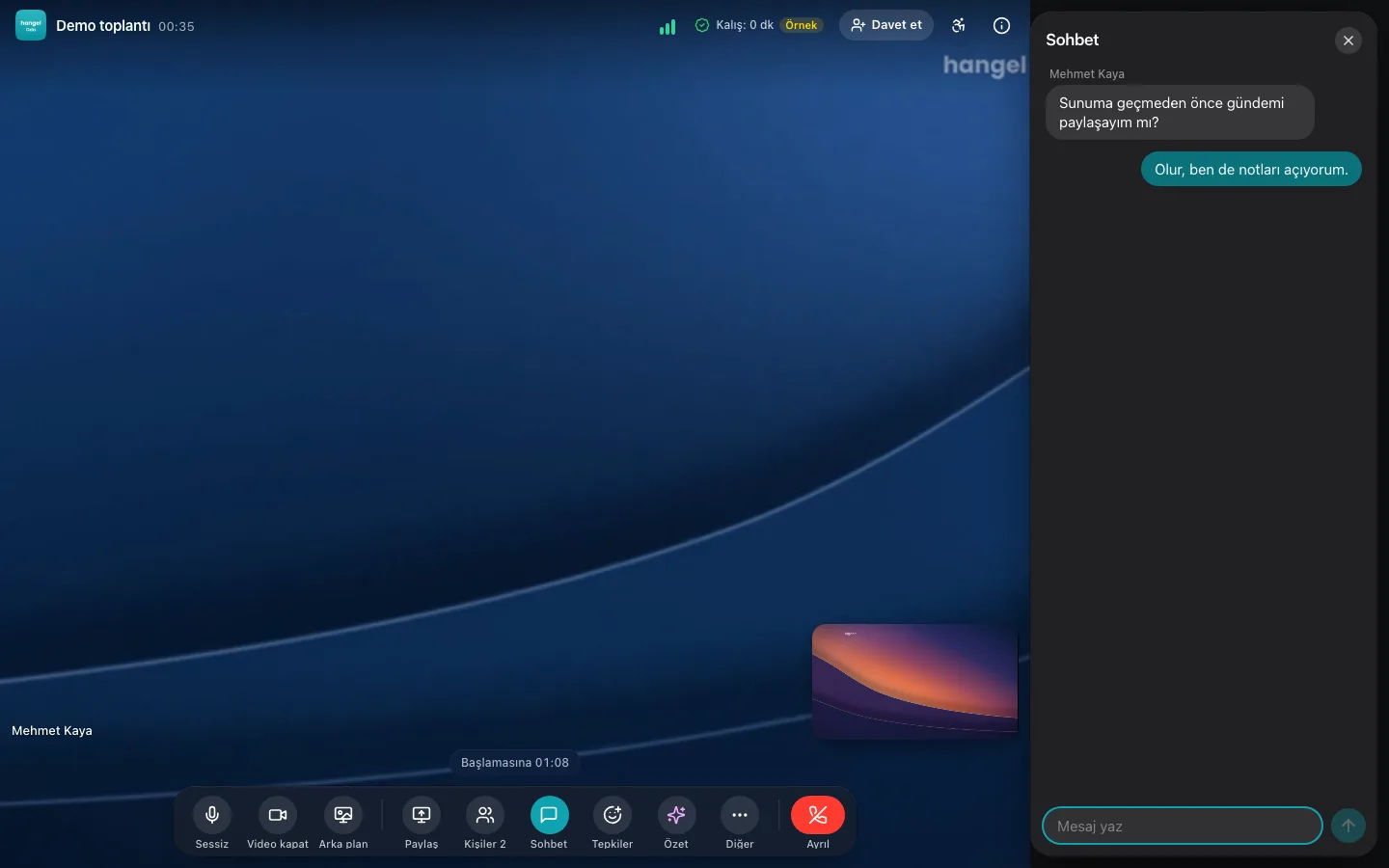
Højdepunkter
What sets us apart from Zoom
The video meeting basics are the same. The difference is that the meeting is tied to the event, the volunteering and the certificate.
Check-in takes care of itself
Whoever joins is matched to their event registration and their time is recorded on the server. No lists, no forms.
Certificates and volunteer hours
Those who meet the time threshold get a verifiable certificate (Open Badges 3.0) when the meeting ends, and volunteer hours go on their profile.
Translated captions at no extra cost
Everyone reads captions in their own language, from 12 languages. On Zoom, translated captions come with Business Plus or a paid add-on.
Hybrid hall mode
A single laptop in the hall connects the in-person event to the room: stage and hall cameras, speaker audio only, giving the floor, a projector screen.
Stage and audience
Camera on puts you on stage, camera off returns you to the audience; listeners receive only audio and the screen, so the same server fits a larger crowd.
Safe and inclusive
Safe mode for under-18s, a chat filter, a pinned sign language interpreter and introductions only when both sides agree.
Funktioner
Ansigt til ansigt, også når du deler.
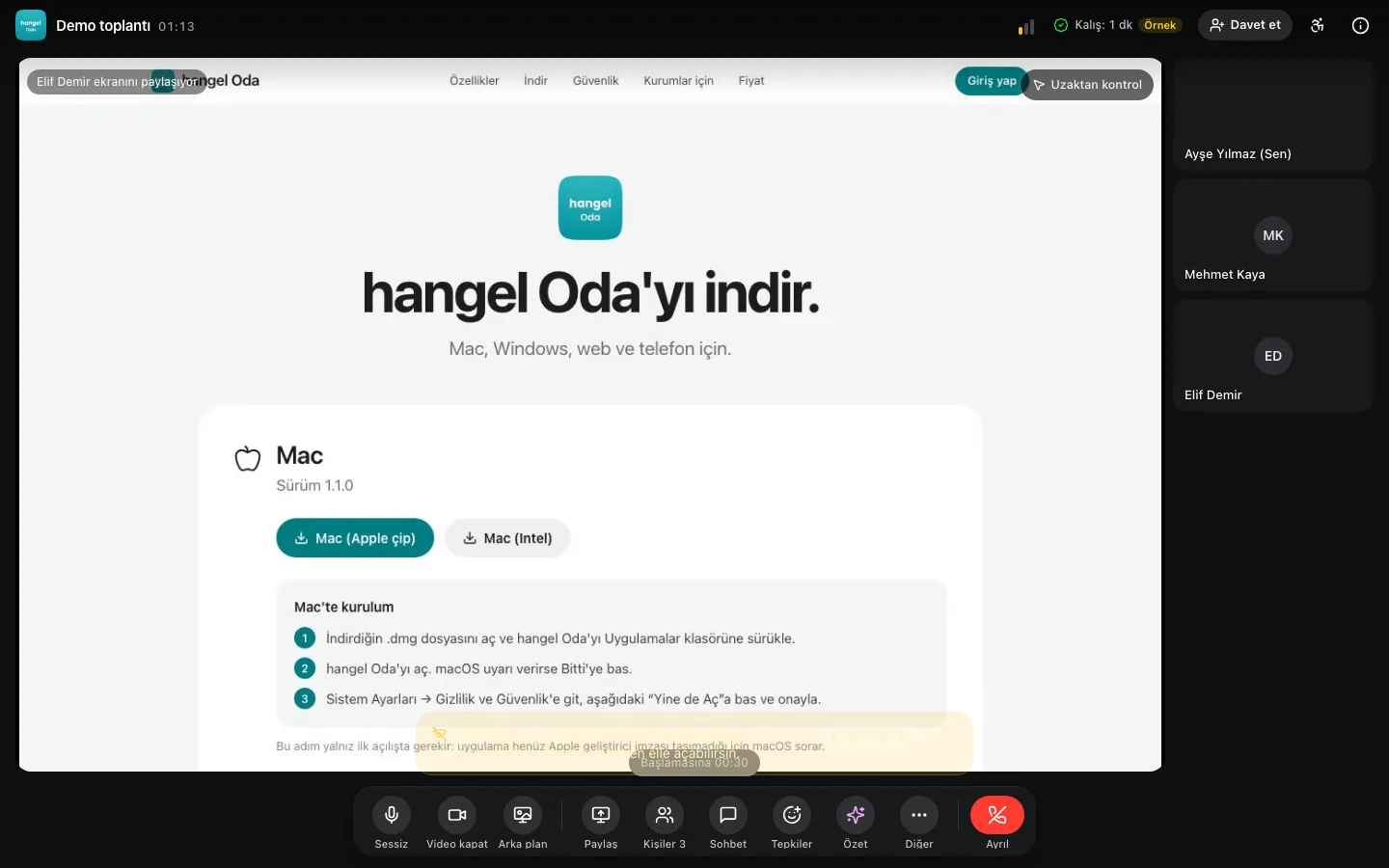
While a screen is shared, participants stay in a strip beside it.
Always-on-top participant window
While presenting, participants stay in a separate window even when you switch apps (Chrome and Edge; picture-in-picture elsewhere).
Weak-connection protection
As the connection worsens, other cameras pause first, then the speaker’s; audio stays on and video returns when it recovers.
Virtual background
Blur, wallpaper-quality hangel backgrounds, a background in your organisation’s colours and logo, or your own image; the image never leaves your device.
AI
Alle på deres eget sprog. AI tager noter.
Live-undertekster og oversættelse, oplæsning på dit sprog samt et resumé, beslutninger og handlingspunkter, når mødet slutter.
AI meeting summary
When the meeting ends, a summary, decisions and action items land in the archive.
Caption translation in 12 languages
Everyone reads captions in their own language.
Listen in your language
Hear other-language speakers aloud in your own language; across 26 languages, with the original voice turned down.
Det samme rum på din telefon.
Deltag fra din telefons browser uden at installere noget. Dine certifikater, noter og optagelser findes i hangel-appen.

Sikkerhed
Hemmeligt rum. Ende-til-ende-krypteret.
Choose “Secret room” when you set up the meeting and audio, video, screen sharing and chat are encrypted and decrypted on participants’ devices; neither the server nor hangel can see the content. The key lives only in the secret link. Recording, live captions, AI notes, voice translation and streaming are off in this mode.
Encrypted connections
Audio and video use WebRTC’s mandatory DTLS-SRTP encryption, and signalling runs over TLS. In a regular room this is not end-to-end encryption: the server decrypts media to route it.


Open-source WebRTC infrastructure
Video and audio travel between browsers over WebRTC, routed by an Apache 2.0-licensed LiveKit server (an SFU). Each participant sends their video once and the server forwards it to the others.
Works on corporate networks
Where UDP is blocked, the connection falls back to TCP and, if needed, to TURN/TLS on port 443, so people behind firewalls can join too.
Processing on your device
The noise filter (RNNoise) and virtual background run in your browser; a background image you upload is never sent to the server.
For organisationer
Møder, der er en del af din organisations arbejde.
Check-in, certifikater, referater og hybridsale ét sted, forbundet med dine arrangementer og dit frivillige arbejde.
Automatic check-in and time
Check-in happens on first entry; time spent, including breakout rooms, is recorded on the server.
Prize draws, quizzes and exams
The same system as at events, with the people in the room: “show on stage” puts the result full screen for everyone; winners get a prize message and those who pass the exam get a certificate.
Hybrid hall mode
Two cameras for stage and hall, speaker microphones only, “give the floor”, applause and a projector screen.
Formal minutes and a Drive folder
Minutes with your organisation’s logo, an attendee table and annexes; download as PDF. A meeting folder is created in the connected Google account and shared only with the organiser.
Fair use and booking
A monthly share for each organisation; if a slot is full, the nearest free time is suggested, and meetings are never cut off.
Invite via hangel, email or phone
A notification to hangel users and an email invitation; for numbers without a hangel account, you send the invitation via WhatsApp or SMS from your own phone.
Priser
Et tilskud til civilsamfundet.
Free for organisations approved for the hangel Civil Society Grant.
- Meeting lengthNo time limit
- Join from the browser, no app
- Screen sharing
- Shared meeting notes
- Turkish interface
Download
På alle enheder.
Apps til Mac, Windows og Android, en Chrome-udvidelse, installation på hjemmeskærmen på iPhone og iPad samt deltagelse fra browseren.
What’s in the room
Everything a meeting needs, on one screen.
App, invitations and reminders
App home screen
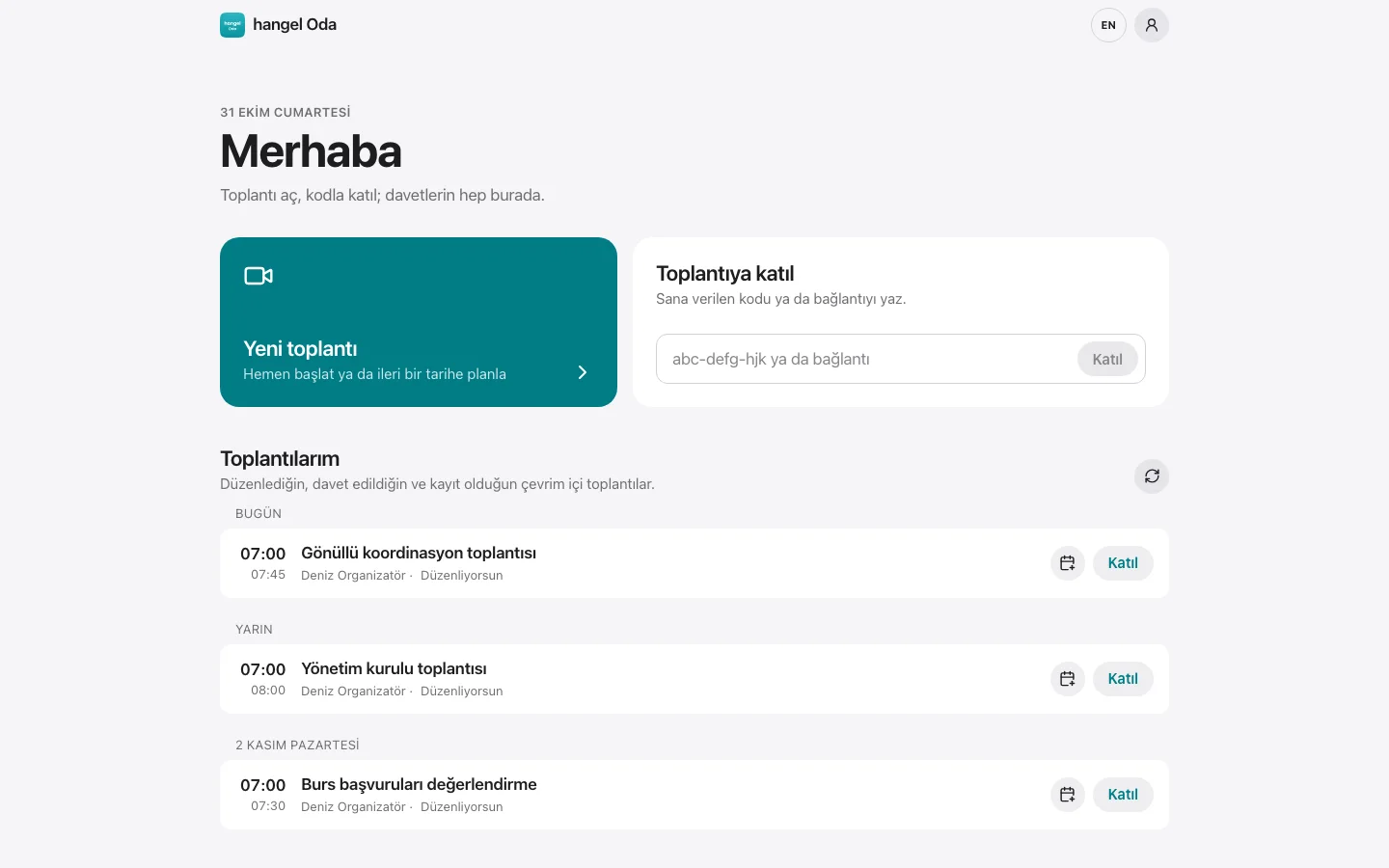
New meeting, join a meeting and My meetings on one screen; installs like an app from the browser (PWA).
Meeting code
Each meeting gets a readable code and a short link (hangel.org/oda/code); typing the code takes you to the right room.
New meeting wizard
Start now or schedule; “invitees only” or “anyone can join”. The meeting opens as a hangel event automatically.
Invite via hangel, email or phone
A notification to hangel users and an email invitation; for numbers without a hangel account, you send the invitation via WhatsApp or SMS from your own phone.
Sharing kit
Link and code, add to calendar, website embed code and AI social media texts in 12 languages.
Reminders 1 day, 1 hour and 10 minutes before
Notifications and emails to attendees, invitees and the organiser; 10 minutes before, a direct “Join”.
Room sign-in screen
Sign in with Google or an email code; the same hangel account on a separate, simple screen.
Mac and Windows app
Opens the room in its own window; share a whole screen or a single window.
Remote control with consent
When the presenter uses the desktop app, others can request control from a browser, phone or tablet; on-screen consent and “Stop control” at any time.
Meeting
Join from the browser
From a phone, tablet or computer, without installing anything.
Preview before you join
Choose your camera, microphone and background before entering.
Faces stay visible while sharing
While a screen is shared, participants stay in a strip beside it.
Always-on-top participant window
While presenting, participants stay in a separate window even when you switch apps (Chrome and Edge; picture-in-picture elsewhere).
Weak-connection protection
As the connection worsens, other cameras pause first, then the speaker’s; audio stays on and video returns when it recovers.
Noise suppression
In strong mode, an open-source AI filter (RNNoise) runs on your device.
Virtual background
Blur, wallpaper-quality hangel backgrounds, a background in your organisation’s colours and logo, or your own image; the image never leaves your device.
Waiting room
If the host turns it on, people wait and are let in one by one or all at once.
“Chain of Kindness” while you wait
A small game in the waiting room or while alone in the room; skippable, sound off.
Host and co-hosts
Mute everyone, remove participants; the host can appoint co-hosts.
Secret room (end-to-end encrypted)
Audio, video and chat are decrypted only on participants’ devices; the key lives in the secret link. Recording, captions and AI notes are off in this mode.
Time and ending
Time remaining is shown; the host can end the meeting for everyone.
Interaction
Chat
Profanity and harassment filter, reporting and chat muting.
Raise hand
A hand icon on the person’s tile and in the list.
Reactions
Applause, hearts and other emoji float across the screen.
Polls
Single or multiple choice; it pops up as a card, and live bars appear when the host shows them. Individual votes are never shown.
Q&A with voting
Questions are upvoted and the most popular rise to the top.
Prize draws, quizzes and exams
The same system as at events, with the people in the room: “show on stage” puts the result full screen for everyone; winners get a prize message and those who pass the exam get a certificate.
Breakout rooms
Random, manual or by interests and skills; mentors are spread across groups.
Shared notes
Everyone writes the same notes together; download as .md.
Whiteboard
Draw together; download as PNG and save to the archive.
Accessibility
Accessibility panel
Large text, high contrast, dyslexia font; your 30 hangel accessibility settings and profiles for 11 need groups carry into the room.
Keyboard shortcuts
Microphone, camera, hand, screen sharing and captions with a single key.
Live captions
Speech appears as text at the bottom of the screen (produced in Chrome and Edge, visible to everyone).
Caption translation in 12 languages
Everyone reads captions in their own language.
Listen in your language
Hear other-language speakers aloud in your own language; across 26 languages, with the original voice turned down.
Sign language interpreter
The interpreter stays pinned in a large tile on everyone’s screen.
Recording and archive
Consent-based recording
Everyone sees a recording notice and gives consent; recordings go to hangel’s Drive and are deleted after 180 days.
Live on YouTube
Speakers in the room, viewers on YouTube; the stream key is stored only on the server.
Meeting archive
Recordings, chat, shared links, notes, poll, quiz, prize draw and exam results, whiteboards and attendance in one window.
Formal minutes and a Drive folder
Minutes with your organisation’s logo, an attendee table and annexes; download as PDF. A meeting folder is created in the connected Google account and shared only with the organiser.
AI meeting summary
When the meeting ends, a summary, decisions and action items land in the archive.
Only in Oda
Automatic check-in and time
Check-in happens on first entry; time spent, including breakout rooms, is recorded on the server.
Automatic certificates
Those who stay long enough get their certificate and volunteer hours when the meeting ends.
The right people get in
Registered attendees, approved volunteers or invitees only.
Hybrid hall mode
Two cameras for stage and hall, speaker microphones only, “give the floor”, applause and a projector screen.
Fair use and booking
A monthly share for each organisation; if a slot is full, the nearest free time is suggested, and meetings are never cut off.
Safe mode for under-18s
Profile sharing is off and a badge is shown.
Mutual introductions
At the end, profiles are shared only if both people agree.
After the meeting
A card pointing to the app for certificates, notes and recordings; joining without the app is never blocked.
Stage and audience mode
Turn your camera on to join the stage, off to return to the audience. Listeners receive only audio and screen sharing, so the same server fits a much larger audience.
Live on the web and on your site
Stream your meeting on the web with one tap: anyone can watch without signing in on hangel.org or on your own site, and people in the room know they are live.
* Recording and YouTube streaming work once the recording and streaming component is enabled on the room server.
Test your camera and microphone
The test runs entirely in your browser; no video or audio is sent anywhere.
Microphone level
The bar should move when you speak.
Plays a short tone; if you hear it, your speakers work.
How it compares
A feature and price comparison with popular meeting tools. Marks in the Oda column show what the room offers today.
| Feature | Oda | Zoom Workplace | Google Meet (Google Workspace) | Microsoft Teams | Jitsi Meet (meet.jit.si) | Whereby |
|---|---|---|---|---|---|---|
| Free plan | YesFor civil society organisations | YesThe Basic plan is free | YesFree with a personal Google account | YesTeams (free/personal) | Yesmeet.jit.si is free; the person opening the room must sign in with Google/GitHub/Facebook (since 24 Aug 2023) | YesFree plan: 1 host, 1 room |
| Meeting length on free plan | No time limitThe room opens around the event time | 40 min40 minutes per meeting | 60 min60 minutes for meetings of 3 or more; 24 hours one-to-one | 60 minGroup meetings up to 60 minutes | 95 minSince 9 Oct 2026 meetings are limited to 95 minutes; 'more changes are coming' | 30 min30 minutes per meeting (since 13 Jan 2025) |
| Participants on free plan | Depends on server capacity | 100100 participants per meeting | 100Up to 100 on a personal account | 100Up to 100 participants | —Could not be verifiedNo official number (forum figures conflict, 75–500). Terms of service: free use is limited to 25 active endpoints per month in total (fair use) | 44 participants per room |
| Cheapest paid plan | Free for organisations approved for the hangel Civil Society Grant | Pro: $14.16/user/month (annual) · $16.99 (monthly)No TRY on the official page; currencies offered are USD/EUR | Business Starter: $7/user/month (annual) · $8.40 (flexible/monthly); Turkiye page: ₺71.20/user/month (excl. tax)The TRY page does not show the annual/flexible split in static text; 50% promotion 12 Nov 2026 – 12 Feb 2027 (₺35.60). No recording on Starter | Teams Essentials: $4.00/user/month (annual billing)The Turkiye page also shows USD 4.00 (no TRY); the microsoft.com page timed out, so the value was taken from the official page's search index | —Could not be verifiedmeet.jit.si has no paid plan; 8x8 JaaS is a separate developer service and its pricing page did not load | Pro: $10.99/host/month (monthly)The annual option says 'save 17%' but shows no amount; no TRY price; Business $13.99/host (minimum 3) |
| Non-profit discount or programme | Yeshangel Civil Society Grant | 50% discountPro, Business, Large Meeting, Webinar; annual only; budget ≤ $10M; Goodstack verification; international equivalents accepted | Google Workspace for Nonprofits: free$0; meetings of 150 participants; Business Standard $3.50/user/month (annual), Business Plus $6.16. Eligibility in Turkiye could not be verified on the page | Microsoft 365 Business Basic grant (free for up to 300 users)Includes Teams; web/mobile apps. The page could not be opened directly and was confirmed from the search index; country eligibility may vary | NoNo separate non-profit programme (the service is already free; self-hosting is open source) | 20% discountRegistered non-profits get 20% on Meetings Pro/Business (monthly/annual) by emailing 'Non-Profit Discount' to support@whereby.com. Source: blog post of 1 Mar 2023 |
| Join from the browser, no app | Yes | YesZoom Web App; the 'join from browser' link depends on the host's settings and features are limited | YesJoin from a supported web browser | YesJoin without an account or download via 'Continue on this browser' (Edge/Chrome recommended) | YesBrowser-based; no download needed | YesNo download needed; the whole call runs in the browser (WebRTC) |
| Screen sharing | Yes | YesOn all plans | YesOn all accounts | YesAlso on the free plan (only 'sharing control' is missing on free) | YesContent sharing | YesIncluding Free |
| Participants visible while sharing | YesAlso a separate always-on-top window | YesSide-by-side view; desktop app only | YesAuto (dynamic) layout shows tiles alongside the presentation; the presentation can be unpinned | Yes'Gallery at top'; 4 or 9 people on the web | YesVideo thumbnail strip (F) and tile view (W) | —Could not be verifiedNo explicit statement on the official page (only 'grid layout control') |
| Raise hand | Yes | YesReactions > Raise hand; *9 by phone | YesOn all Business editions including Business Starter; no separate documentation for free personal accounts | YesAmong meeting reactions | YesRaise hand and reactions | YesRaise hand |
| Chat | Yes | YesIn-meeting chat setting on all accounts | YesIn-meeting chat | YesUnlimited chat on all plans | YesChat with private messages | YesLive chat, reactions |
| Shared meeting notes | YesPlus an AI meeting summary | PartlyMy Notes are personal (not shared automatically); Basic accounts can share notes with up to 5 people a day; Canvas notes on desktop only | PartlyGemini 'Take notes for me' automatic notes (work/school account or Google AI plan); no in-meeting panel for writing notes together | PartlyLoop-based meeting notes on work/school accounts (OneDrive/SharePoint licence); not in personal Teams | NoNo shared document (Etherpad) configured on meet.jit.si; only the Excalidraw whiteboard (25 people). Etherpad can be added when self-hosting | PartlyCollaboration via Google Docs and Miro integrations; no built-in notes |
| Recording | YesWith consent; to Drive, once the recording server is on | PartlyFree plan: local (computer) recording only; cloud recording on paid plans | NoNot on the free plan; Google One 2 TB+/Workspace Individual/Business Standard and above | NoNot on the free plan; available on M365 Personal/Family and business licences | PartlyLocal recording (from the browser to your own device) is on; server/cloud recording is off | NoNot on the free plan; local recording on Pro and above |
| Attendance and duration report | YesAutomatic check-in, time spent and certificates | Pro and aboveReports are only generated for meetings on paid accounts | Business Plus and aboveNot on Starter/Standard; not on Google One | PartlyOn work/school licences, with join and leave times; the official page does not say whether it is on the free plan or from which business plan | PartlyOnly speaker statistics (who spoke for how long); no attendance report | NoNot in the Meetings product; Insights only in the Embedded (developer) product |
| Breakout rooms | YesGrouping by interests and skills | YesOn all plans, including Basic | NoNot on the free plan; Business Standard and above (Google One can only join) | NoNot on the free plan; business licences only | YesThe moderator opens breakout rooms; breakout room events are enabled in the meet.jit.si configuration | Pro and aboveNot on Free |
| Live streaming to YouTube | YesOnce the streaming server is on | Pro and abovePro/Business/Education/Enterprise, licensed host; ~20 s delay | PartlyEnterprise, Education Plus, Workspace Individual, Google One 2 TB+; not on Business editions | PartlyVia RTMP-Out (Custom Streaming app); an admin must enable it in the meeting policy (business tenants) | YesLive streaming is enabled on meet.jit.si (liveStreaming.enabled: true), with a YouTube stream key | NoRTMP live streaming only in the Embedded (developer) product; not listed for Meetings |
| Turkish interface | Yes12 languages | YesTurkish is among the app languages; mobile follows the phone language | YesThe interface follows the Google account language; Turkish captions are available too (the pricing page opened from Turkiye is in Turkish) | YesTurkish is among the interface languages (Teams for Education list) | YesTurkish is among the interface languages | NoTurkish is not in the interface language list (only Turkish captions/transcription) |
| Can be self-hosted | YesOpen-source LiveKit; on LiveKit Cloud today | NoClosed-source cloud service | NoClosed-source cloud service | NoMicrosoft cloud only | YesOpen source, Apache 2.0; Debian package and Docker | NoClosed-source cloud service |
| End-to-end encryption | YesIn secret-room mode; recording/captions/AI notes off | YesCan be enabled on the free plan too (host SMS verification); not in the web client; cloud recording and more are disabled while on | PartlyClient-side encryption only on Enterprise Plus/Education Standard-Plus; additional end-to-end encryption on personal one-to-one calls | PartlyOn one-to-one calls (if an admin enables it); meetings need Teams Premium, up to 200 people, not on the web | YesFrom the security menu in Chromium 83+ browsers; audio/video/screen (not chat) | PartlyEnd-to-end only in small P2P rooms; in larger rooms media is decrypted on the server |
| Only in Oda | ||||||
| Automatic check-in on joining, matched to event registration | YesTime in the room is recorded on the server | —Could not be verified | —Could not be verified | —Could not be verified | —Could not be verified | —Could not be verified |
| Automatic verifiable certificate based on time attended | YesOpen Badges 3.0 · W3C verifiable credential | —Could not be verified | —Could not be verified | —Could not be verified | —Could not be verified | —Could not be verified |
| Volunteer hours recorded | Yes | —Could not be verified | —Could not be verified | —Could not be verified | —Could not be verified | —Could not be verified |
| Live translated captions | Yes12 languages, no extra cost | PartlyBusiness Plus and above, or the paid Translated Captions add-on | PartlyOn Workspace Business Standard and above | PartlyThe organiser needs a Teams Premium or Microsoft 365 Copilot licence | —Could not be verified | —Could not be verified |
| Hear speakers aloud in your own language | Yes26 languages, no extra cost | PartlyPro, Business and Enterprise; in the desktop app, with ZoomMate or the paid Live Translation add-on | PartlyThe host needs Google AI Pro/Ultra or Workspace Business Standard and above | PartlyInterpreter: the listener needs a Microsoft 365 Copilot licence | —Could not be verified | —Could not be verified |
| AI meeting summary (summary, decisions, action items) | YesFree, saved to the meeting archive | PartlyWith paid accounts; on free Basic only selected features as a trial | PartlyGemini "Take notes for me": work/school account or a Google AI plan | —Could not be verified | —Could not be verified | —Could not be verified |
| Formal minutes: attendee table, annexes, PDF and a Drive folder | YesWith your logo, when the meeting ends | —Could not be verified | —Could not be verified | —Could not be verified | —Could not be verified | —Could not be verified |
| Hybrid hall mode: two cameras, give the floor, projector screen | YesOne laptop in the hall is enough | —Could not be verified | —Could not be verified | —Could not be verified | —Could not be verified | —Could not be verified |
| Breakout groups by interests and skills, with mentors spread across groups | Yes | —Could not be verified | —Could not be verified | —Could not be verified | —Could not be verified | —Could not be verified |
| Safe mode for under-18s and chat filter | Yes | —Could not be verified | —Could not be verified | —Could not be verified | —Could not be verified | —Could not be verified |
| Prize draws, prize quizzes and certificate exams in the meeting | YesThe pool is whoever is in the room; results on everyone’s screen and as an annex in the minutes | —Could not be verified | —Could not be verified | —Could not be verified | —Could not be verified | —Could not be verified |
Prices were taken from official pages on 30 October 2026 and may change.
— : No equivalent found on this tool's official feature and pricing pages (as of 30 October 2026). Equivalents we found are listed with sources.
Sources
- https://zoom.us/pricing
- https://support.zoom.com/hc/en/article?id=zm_kb&sysparm_article=KB0080298
- https://support.zoom.com/hc/en/article?id=zm_kb&sysparm_article=KB0064261
- https://support.zoom.com/hc/en/article?id=zm_kb&sysparm_article=KB0067526
- https://support.zoom.com/hc/en/article?id=zm_kb&sysparm_article=KB0068290
- https://support.zoom.com/hc/en/category?id=kb_category&kb_category=b9823e128720391089a37408dabb35a2
- https://support.zoom.com/hc/en/article?id=zm_kb&sysparm_article=KB0057693
- https://support.zoom.com/hc/en/article?id=zm_kb&sysparm_article=KB0060623
- https://support.zoom.com/hc/en/article?id=zm_kb&sysparm_article=KB0062284
- https://support.zoom.com/hc/en/article?id=zm_kb&sysparm_article=KB0062475
- https://support.zoom.com/hc/en/article?id=zm_kb&sysparm_article=KB0065408
- https://support.google.com/meet/answer/7317473?hl=en
- https://knowledge.workspace.google.com/admin/getting-started/editions/business-editions
- https://www.google.com/nonprofits/offerings/workspace/
- https://support.google.com/meet/answer/9308856?co=GENIE.Platform%3DDesktop&hl=en
- https://support.google.com/meet/answer/9292748?hl=en&co=GENIE.Platform%3DDesktop
- https://knowledge.workspace.google.com/admin/meet/compare-meet-features-across-google-workspace-editions
- https://support.google.com/meet/answer/14754931?hl=en&co=GENIE.Platform%3DDesktop
- https://support.google.com/meet/answer/10459644?hl=en
- https://support.google.com/meet/answer/12383549?hl=en
- https://support.google.com/meet/answer/15077804?hl=en&co=GENIE.Platform%3DDesktop
- https://workspace.google.com/pricing
- https://support.google.com/meet/answer/12387251?hl=en
- https://support.microsoft.com/en-us/office/learn-more-about-subscriptions-for-microsoft-teams-free-1061bbd0-6d97-46a6-8ca0-21059be3eee3
- https://www.microsoft.com/en-us/microsoft-teams/compare-microsoft-teams-business-options
- https://www.microsoft.com/en-us/microsoft-365/business/nonprofit-plans-and-pricing
- https://support.microsoft.com/en-us/teams/meetings/join-a-meeting-without-an-account-in-microsoft-teams
- https://support.microsoft.com/en-us/teams/meetings/customize-your-meeting-view-in-microsoft-teams
- https://learn.microsoft.com/en-us/microsoft-365/loop/loop-requirements?view=o365-worldwide
- https://support.microsoft.com/en-us/teams/meetings/manage-meeting-attendance-reports-in-microsoft-teams
- https://learn.microsoft.com/en-us/microsoftteams/stream-teams-meetings
- https://support.microsoft.com/en-us/topic/languages-supported-in-microsoft-teams-for-education-293792c3-352e-4b24-9fc2-4c28b5de2db8
- https://learn.microsoft.com/en-us/microsoftteams/teams-end-to-end-encryption
- https://jitsi.org/security/
- https://jitsi.org/blog/changes-coming/
- https://jitsi.org/meet-jit-si-terms-of-service/
- https://github.com/jitsi/jitsi-meet
- https://web-cdn.jitsi.net/faq/meet-faq.html
- https://jitsi.github.io/handbook/docs/user-guide/keyboard-shortcuts
- https://meet.jit.si/config.js
- https://jitsi.github.io/handbook/docs/dev-guide/dev-guide-iframe-commands/
- https://github.com/jitsi/jitsi-meet/blob/master/lang/languages.json
- https://whereby.com/information/meetings/pricing
- https://whereby.com/blog/how-were-helping-non-profits-stay-connected-for-less/
- https://whereby.com/information/features
- https://docs.whereby.com/reference/using-the-whereby-embed-element
- https://news.zoom.com/bridge-the-language-gap-and-connect-people-with-zoom-translated-captions/
- https://news.zoom.com/zoom-launches-ai-companion-3-0/
- https://www.zoom.com/en/blog/voice-translation-zoom/
- https://support.google.com/meet/answer/10964115
- https://support.google.com/meet/answer/16221730?hl=en
- https://support.microsoft.com/en-au/office/use-live-captions-in-microsoft-teams-meetings-4be2d304-f675-4b57-8347-cbd000a21260
- https://support.microsoft.com/en-us/teams/copilot/interpreter-in-microsoft-teams-meetings-and-calls
Frequently asked questions
Who can use it at no cost?
Free for organisations approved for the hangel Civil Society Grant.
Do I need to install an app?
No. The room opens in up-to-date Chrome, Safari, Firefox and Edge browsers. If you like, install it like an app from the browser or download the Mac and Windows app; giving remote control requires the desktop app.
Who can enter a room?
The host at any time; registered attendees and approved volunteers close to the event time. For invite-only listings, only invited people.
Are meetings recorded?
Only if the host starts a recording. Everyone in the room sees a notice and a consent prompt; anyone who declines can stay with camera and microphone off. Recordings are kept in hangel’s Drive and deleted after 180 days. Join and leave times are always recorded.
Which browsers support live captions?
Captions are produced by the speaker’s browser: Chrome and Edge. Safari and Firefox users see others’ captions and can translate them into their language.
How does it work for hybrid events?
Connect two cameras and the speaker microphones to a computer in the hall. Online viewers see the stage large and the hall small; the room’s general sound is not streamed. An online participant’s voice plays in the hall only when the host gives them the floor. People in the hall check in by QR and online participants from the room, into the same list.
How do I start using the room?
The room is live. Sign in and use “New meeting” to start right away, or choose Oda as the meeting tool in event and volunteering forms. You can also open a demo meeting without signing in.
Is it end-to-end encrypted?
In secret-room mode, yes: audio, video and chat are decrypted only on participants’ devices; the key lives in the # part of the secret link and never reaches the server. Recording, live captions, AI notes and voice translation are off in this mode. In a regular room connections are encrypted (DTLS-SRTP and TLS), but the server decrypts media to route it.
What does the demo keep?
Nothing. The demo room keeps no check-in, time records, recordings or saved notes; the name you enter is only visible to people in the room. The demo closes after 15 minutes.
Your meeting, right inside hangel.
No sign-in · up to 3 people · 15 minutes · no attendance or recording